


We've released openclaw-basic-memory, a Basic Memory plugin for OpenClaw that gives your agent persistent, searchable memory across sessions. And the best part is how it got made.
We installed OpenClaw, pointed it at the Basic Memory codebase, and told it to build a plugin. It read through the source, figured out the architecture, wrote a working integration, ran the tests, iterated on what broke, and submitted pull requests back to the repo. All by itself.
The plugin it wrote solves a real problem. If you've used OpenClaw for any serious work, you've hit the moment where your agent just forgets everything. The community calls it the "lobotomy problem," and one user documented losing roughly 45 hours of accumulated work to context compaction. OpenClaw's memory relies on local files loaded at startup, and when conversations get long enough, compaction clears the history to stay within token limits. For quick tasks this barely matters. For sustained work where your agent has built up real context over hours, it's painful.
Bigger context windows don't fix it. Studies show that dumping an entire conversation history into a large window actually degrades reasoning quality. Memory is a knowledge management problem, not a context window problem.
So why could OpenClaw build this plugin on its own? Because Basic Memory's codebase is structured as a navigable knowledge graph. OpenClaw didn't need us to explain how anything worked. It explored the code, pulled connected concepts, understood how the pieces fit together, and wrote something functional. We reviewed it, made some tweaks, and shipped it.
How the Plugin Works
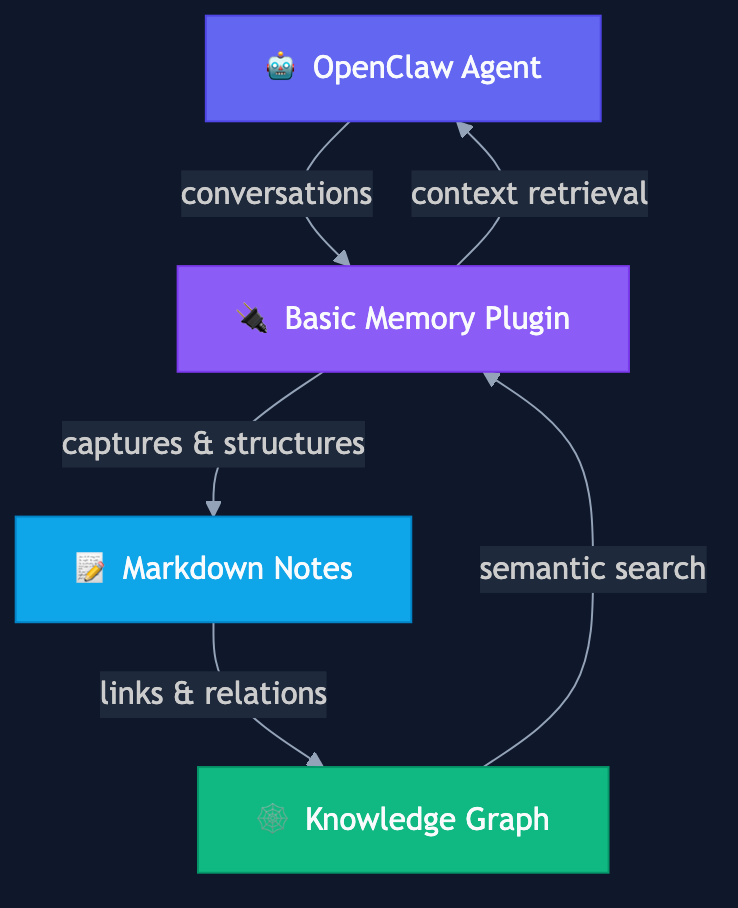
openclaw-basic-memory gives OpenClaw agents persistent memory backed by a semantic knowledge graph.
When your agent has a conversation, the plugin captures it as structured Markdown notes with observations, categories, and relations. Each note links to others through shared topics and memory:// URLs, building a knowledge graph that grows over time. When your agent needs context from a previous session, it searches the graph and pulls back connected concepts rather than scanning flat text.
The plugin gives your agent seven tools for working with the knowledge graph. bm_search and bm_context handle semantic search and graph navigation, letting the agent find relevant notes and explore connected concepts at different depths. bm_read, bm_write, and bm_edit cover the basics of reading, creating, and modifying notes. bm_delete and bm_move round things out for cleanup and organization. There are also two slash commands for quick access: /remember <text> saves a brief note, and /recall <query> searches the knowledge graph right from the chat.
Three Ways to Use It
We designed three modes so you can adopt it however makes sense.
Archive Mode is the gentlest start. It runs alongside OpenClaw's existing memory system and quietly captures your conversations as structured notes in the background. Your current workflow doesn't change at all. You just start accumulating a searchable knowledge graph over time. Set autoCapture: true and forget about it.
Agent-Memory Mode replaces OpenClaw's built-in memory entirely. Your agent reads and writes to the knowledge graph for all its context, using semantic search and graph navigation instead of flat file loading. This gives you the fullest experience but changes how memory works at a fundamental level.
Both Mode runs them together. You get the archive capturing everything in the background plus the full knowledge graph tools for retrieval. Maximum coverage if you want everything.
In all three modes, your data lives as plain Markdown files on your filesystem, by default in ~/.basic-memory/openclaw/. You can open them in any text editor, commit them to git, or browse them in Obsidian. OpenClaw takes a CLI-first approach and doesn't use MCP, so the plugin talks to Basic Memory through its CLI (bm tool search-notes, bm tool read-note, etc.) rather than the MCP server. Same knowledge graph, same data. And since those same notes are accessible via MCP, any tool that does support the protocol can read them too.
Setup
Install the Basic Memory CLI:
uv pip install basic-memory
Clone and install the plugin:
git clone https://github.com/basicmachines-co/openclaw-basic-memory
cd openclaw-basic-memory
bun install
Add it to your OpenClaw config:
{
  plugins: {
    entries: {
      "basic-memory": {
        enabled: true,
        config: {
          mode: "archive",
          project: "my-project",
          autoCapture: true
        }
      }
    }
  }
}
That's it. Start a conversation and your agent will begin building its knowledge graph. In Archive Mode the plugin runs silently in the background. If you switch to Agent-Memory Mode, your agent will start using /remember and bm_write on its own to save important context.
You can also access notes directly from the command line:
openclaw basic-memory search "authentication decisions"
openclaw basic-memory read "Project Architecture"
openclaw basic-memory context "memory://project/design-decisions" --depth 2
openclaw basic-memory recent --timeframe 7d
openclaw basic-memory status
Memory Across the Agent Ecosystem
The agent landscape is fragmenting fast. OpenClaw, Claude Code, Cursor, Windsurf, Copilot, and more are all shipping their own approaches to memory, and none of them talk to each other. Your context with one agent stays locked inside that agent. Switch tools and you start over.
Basic Memory sits underneath all of them. Agents that support MCP connect directly. For ones that don't, like OpenClaw, Basic Memory's CLI works just as well. The decisions you captured working with Claude Desktop are there when you open OpenClaw. The architecture notes your coding agent wrote are searchable from VS Code. One knowledge base, many agents, and it's all just Markdown files on your filesystem that you actually own.
We think that's where this is headed. Agents will keep getting better, new ones will keep appearing, and the one thing you shouldn't have to rebuild every time you try a new tool is your accumulated knowledge. Basic Memory bridges the gap between human memory and machine memory by keeping everything in a format both can work with. Your agent writes structured notes, you read and edit them in plain Markdown, and the knowledge compounds for everyone.
The plugin is fully open source. Check out the GitHub repo, or try Basic Memory free at basicmemory.com.