

A memory you can open, now inside ChatGPT
> Install Basic Memory Cloud from the Plugin Directory. No Developer mode, no server URL, no custom connector setup.
Published · OAuth connection · No server URL required
Connect the published plugin. Start talking.
Basic Memory Cloud is reviewed, published, and searchable inside ChatGPT. Connect once, then bring your notes into any conversation by mentioning the plugin.
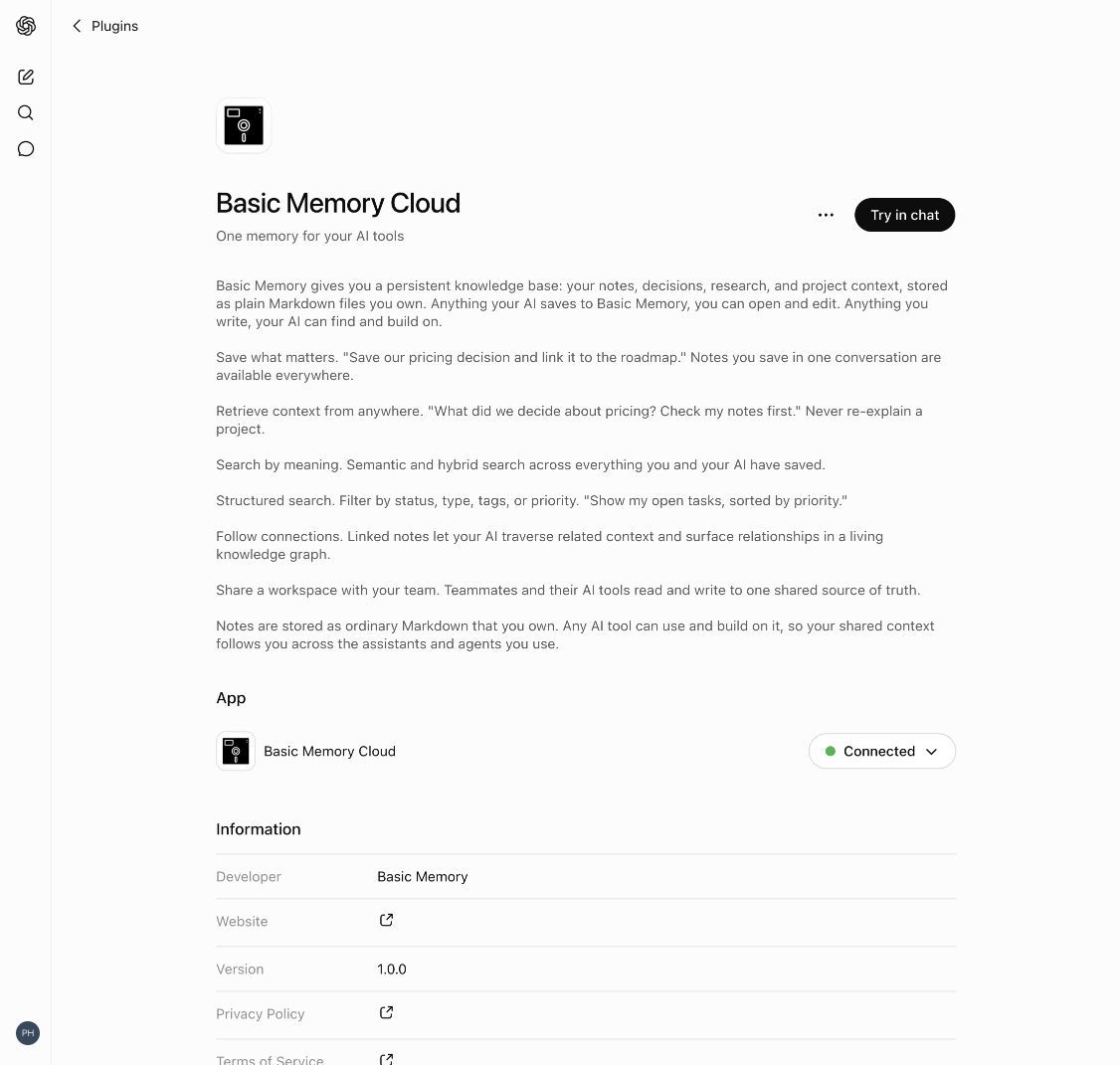
- 01 / find
Open Basic Memory Cloud
Open the published plugin directly, or choose Plugins in the ChatGPT sidebar and search for the exact name Basic Memory Cloud.
- 02 / connect
Authorize your account
Select Connect and complete the Basic Memory authorization flow. You can create an account during sign-in if you need one.
- 03 / use
Bring it into a chat
Select Try in chat, mention @Basic Memory Cloud, or choose it from + → More in an existing conversation.
Built-in memory only takes you so far
ChatGPT remembers your preferences and the chat you're in. Everything bigger than a thread is on you to organize, recall, and carry forward.
Built-in memory is great at short-term. Decisions, research, and accumulated context need somewhere durable to live.
Knowledge built up in ChatGPT can't follow you to Claude, Cursor, or your editor.
You can't read, edit, or take with you what the AI actually saved about your work.
Memory you can't open is hard to trust and impossible to correct.
Basic Memory changes that
Give ChatGPT a persistent, searchable knowledge base it can read and write to.
Long-term layer for short-term memory
ChatGPT's built-in memory carries the working thread. Basic Memory carries the long-term record. Both run together on the same turn. Keep ChatGPT memory on; turn this on too.
Read, edit, and own the file
Notes are plain Markdown on your disk or in your cloud workspace. Open them in Obsidian, edit them by hand, version them in Git, take them anywhere.
Shared with every other AI tool
The same knowledge base is available in Claude, Cursor, Codex, Hermes, OpenClaw, and any MCP client. Your context follows you across vendors.
Official published ChatGPT plugin
Find Basic Memory Cloud in the Plugin Directory, select Connect, and authorize your account. No Developer mode or server URL required.
Manual MCP setup, when you need it
MCP endpoint
https://cloud.basicmemory.com/mcpThe published plugin is the recommended setup. Use this endpoint only when the directory listing is unavailable or you specifically need a custom MCP connection. The manual flow requires Developer mode; the directory flow does not. Full setup guide →
Start building with ChatGPT
Try Basic Memory free for 7 days. Your notes stay yours either way.
7-Day Free Trial
$15/seat/month
Graduated team pricing
Open source available for power users
Frequently asked questions
How do I give ChatGPT persistent memory with Basic Memory?
Install Basic Memory Cloud from ChatGPT’s Plugin Directory. Open the published plugin, select Connect, and complete the authorization flow. Then choose Try in chat, mention @Basic Memory Cloud, or select it from + → More in an existing conversation. No Developer mode or server URL is required.
Does this replace ChatGPT’s built-in memory?
No. Keep it on. ChatGPT’s built-in memory is the short-term layer: your preferences, the thread of a chat, what you said yesterday. Basic Memory is the long-term layer underneath: a large, owned knowledge base in plain Markdown that the same context can travel to Claude, Cursor, Hermes, OpenClaw, or anywhere else you work. Both run together on the same turn.
What does ChatGPT actually get?
Through the remote MCP connector, ChatGPT gets the full Basic Memory tool surface: full-text and semantic search across your notes, read and write any note by title or permalink, navigate the knowledge graph via memory:// URLs, list directories, get recent activity, switch between projects and team workspaces, and validate notes against schemas. Twenty-plus tools in total.
Will my context follow me to other AI tools?
Yes. That is the point. The same knowledge base is available to Claude, Cursor, Codex, Hermes, OpenClaw, the Gemini CLI, Obsidian, VS Code, and any other MCP client. Build context once in ChatGPT, recall it tomorrow in Cursor.
What does it cost to use Basic Memory with ChatGPT?
Basic Memory is free and open source (AGPL-3.0) to run locally. The published ChatGPT plugin connects to Basic Memory Cloud, which starts at $15/seat/month with a 7-day trial. Plugin availability can also depend on your ChatGPT plan, region, workspace settings, and role.