

A memory Claude can keep—and you can open
> Install Basic Memory Cloud from Claude’s Connectors Directory. One connection gives Claude a knowledge base that grows across conversations.
Published · OAuth connection · No server URL required
One install. Every Claude surface.
Basic Memory Cloud is published in Claude’s Connectors Directory. Install it once on your Claude account, then use the same memory on the web, desktop, mobile, Cowork, and Claude Code.
- 01 / open
Open the directory
Open Claude’s Connectors Directory, or go to Settings → Customize → Connectors and select +.
- 02 / find
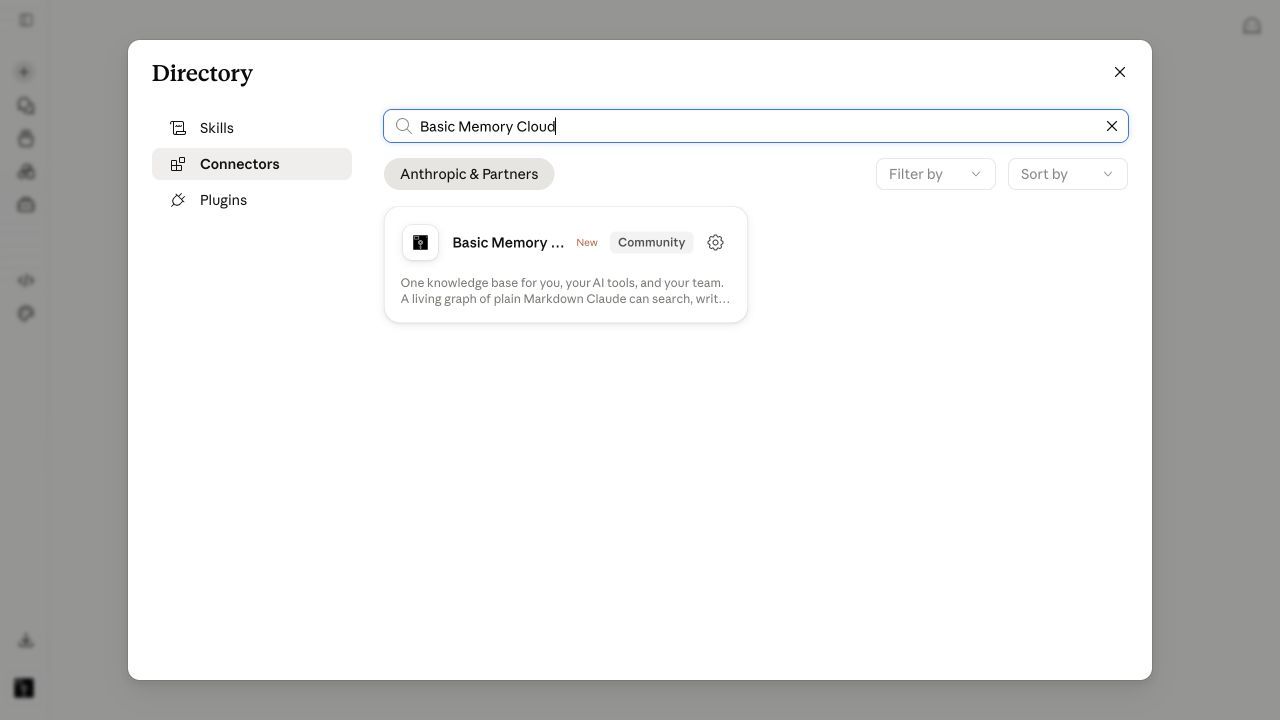
Search Basic Memory Cloud
Open the published connector to review its description and the knowledge tools it adds to Claude.
- 03 / install
Install and authorize
Select Install, complete the Basic Memory authorization flow, then ask Claude to list your Basic Memory projects.
A great conversation should not be a dead end
Claude is excellent at the conversation in front of it. The decisions, research, and context worth keeping need a durable home outside the thread.
The useful decisions in a great conversation are hard to find once the thread disappears into chat history.
Project knowledge gets compressed into summaries instead of staying available as complete, editable notes.
Context built in Claude cannot naturally follow you into ChatGPT, Codex, Cursor, or your editor.
Memory you cannot open, correct, organize, and export is difficult to treat as a source of truth.
Basic Memory changes that
Give Claude a persistent, searchable knowledge base it can read and write to.
Official published Claude connector
Find Basic Memory Cloud in Claude's Connectors Directory, select Install, and authorize your account. No custom endpoint required.
Claude reads and writes the same graph
Ask naturally. Claude can create structured notes, search by meaning, follow linked context, and update what changed without leaving the conversation.
A web app and plain Markdown
Open every note Claude writes, edit it yourself, browse projects, recover history, and export your files. The memory is visible and yours.
One connection across Claude
The remote connector follows your Claude account across the web, desktop, mobile, Cowork, and Claude Code. The same knowledge also works in other MCP clients.
Manual MCP setup, when you need it
MCP endpoint
https://cloud.basicmemory.com/mcpThe published directory connector is the recommended cloud setup. Use this endpoint only if the listing is unavailable or you specifically need to add a custom connector yourself. Basic Memory can also run locally through Claude Desktop. Full setup guide →
What users are saying
“Basic Memory changed my whole relationship with LLMs. I switched to exclusively Claude and Claude Code because of this integration.”
“Basic Memory is the missing 'wow' factor in AI chatbots—now I can't imagine Claude or Claude Code without it.”
Start building with Claude
Try Basic Memory free for 7 days. Your notes stay yours either way.
7-Day Free Trial
$15/seat/month
Graduated team pricing
Open source available for power users
Frequently asked questions
How do I connect Basic Memory Cloud to Claude?
Install Basic Memory Cloud from Claude’s Connectors Directory. Open the directory, search for Basic Memory Cloud, select Install, and complete the authorization flow. You can also open Settings → Customize → Connectors and select + to browse published connectors.
Where can I use the Claude connector?
The connection follows your Claude account across Claude on the web, Claude Desktop, mobile, Cowork, and Claude Code. Once Basic Memory Cloud is installed and authorized, you do not need to configure it separately on every Claude surface.
What can Claude do with Basic Memory?
Claude can search your notes by words or meaning, read complete notes, write and edit structured Markdown, follow relations between notes, review recent activity, and work across projects. Ask in ordinary language; Claude chooses the appropriate Basic Memory tools.
Does this replace Claude’s built-in memory?
No. Claude’s built-in memory and Basic Memory serve different roles. Built-in memory carries preferences and short summaries inside Claude; Basic Memory holds the complete, editable knowledge you want to search, organize, and use across other AI tools.
Can ChatGPT and Claude share the same memory?
Yes. Both published directory integrations connect to the same Basic Memory Cloud knowledge base. Save a note with Claude, open it in the web app, and recall it later from ChatGPT, Codex, Cursor, or another MCP client.