

Welcome to Basic Memory.
Your workspace is ready.
One place for the notes, decisions, and context you want to keep across every AI you use.
# Portugal trip
- [stay] Spend four nights in Lisbon
- [travel] Take the train to Porto
- [decision] Skip the rental car
Relates to [[Spring Travel Plans]]
Connect one AI. Save one thing.
Find it again.
Choose the assistant you already use, connect Basic Memory Cloud, then run this tiny save-and-recall test. You will know the whole loop is working before you build anything bigger.
- 01 / connect
Choose where you want to start.
Install Basic Memory Cloud in one assistant. You can add every other tool later; one working conversation is enough for day one.
- 02 / save
Ask your AI to keep a decision.
“Use Basic Memory Cloud to save our Portugal trip decision: spend four nights in Lisbon, take the train to Porto, and skip the rental car. Link it to our spring travel plans.”
- 03 / openOpen the note →
See the note on your side.
Open Basic Memory and look in your current project. The decision is now a file you can read, edit, move, or export.
- 04 / recall
Start a new chat and pull it back.
“Use Basic Memory Cloud to find our Portugal trip note and remind me what we decided.”
Your memory has a front door.
This is where the notes live.
The Basic Memory app is the other side of the conversation. Browse every note your AI writes, edit it yourself, and see how your knowledge connects.
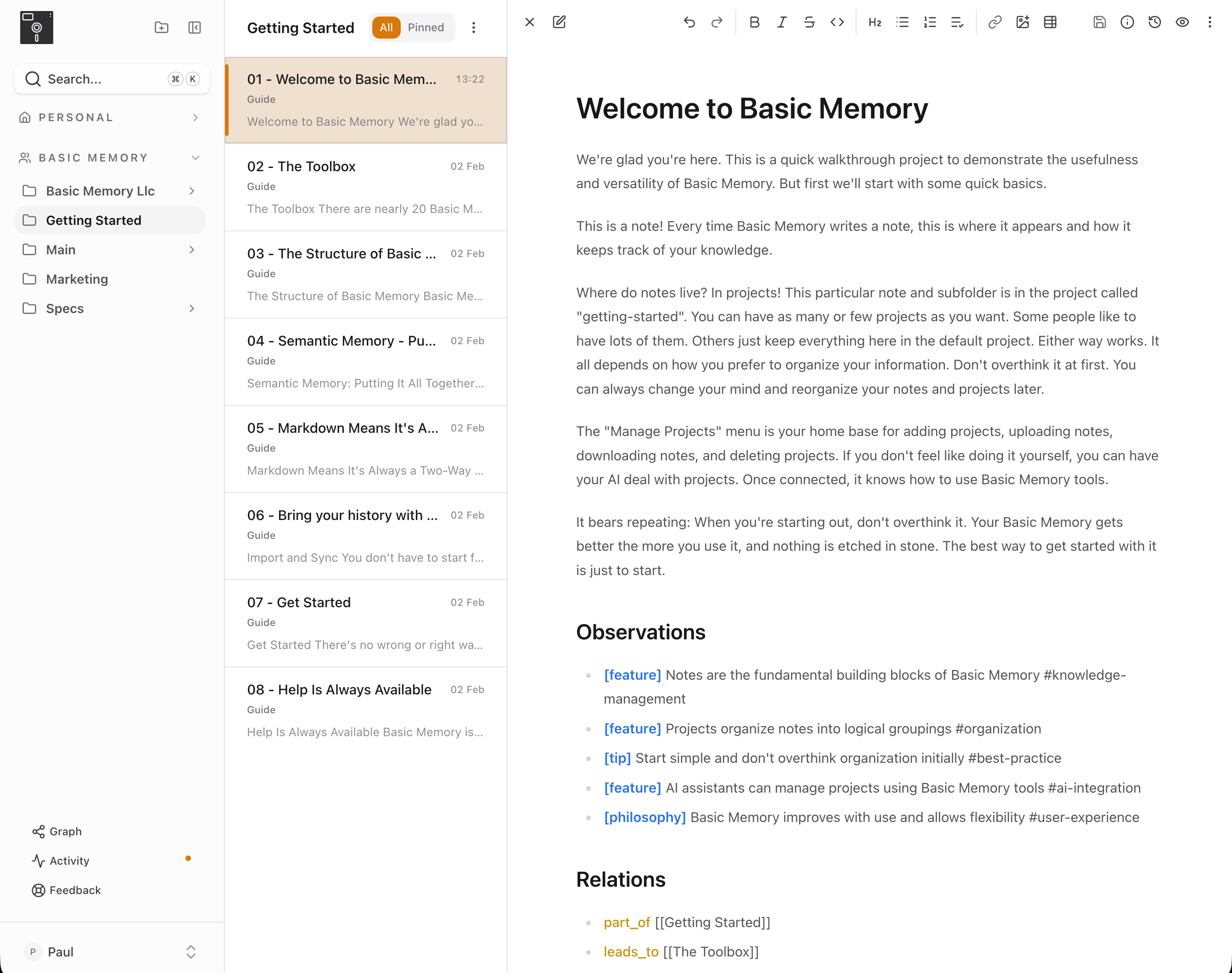
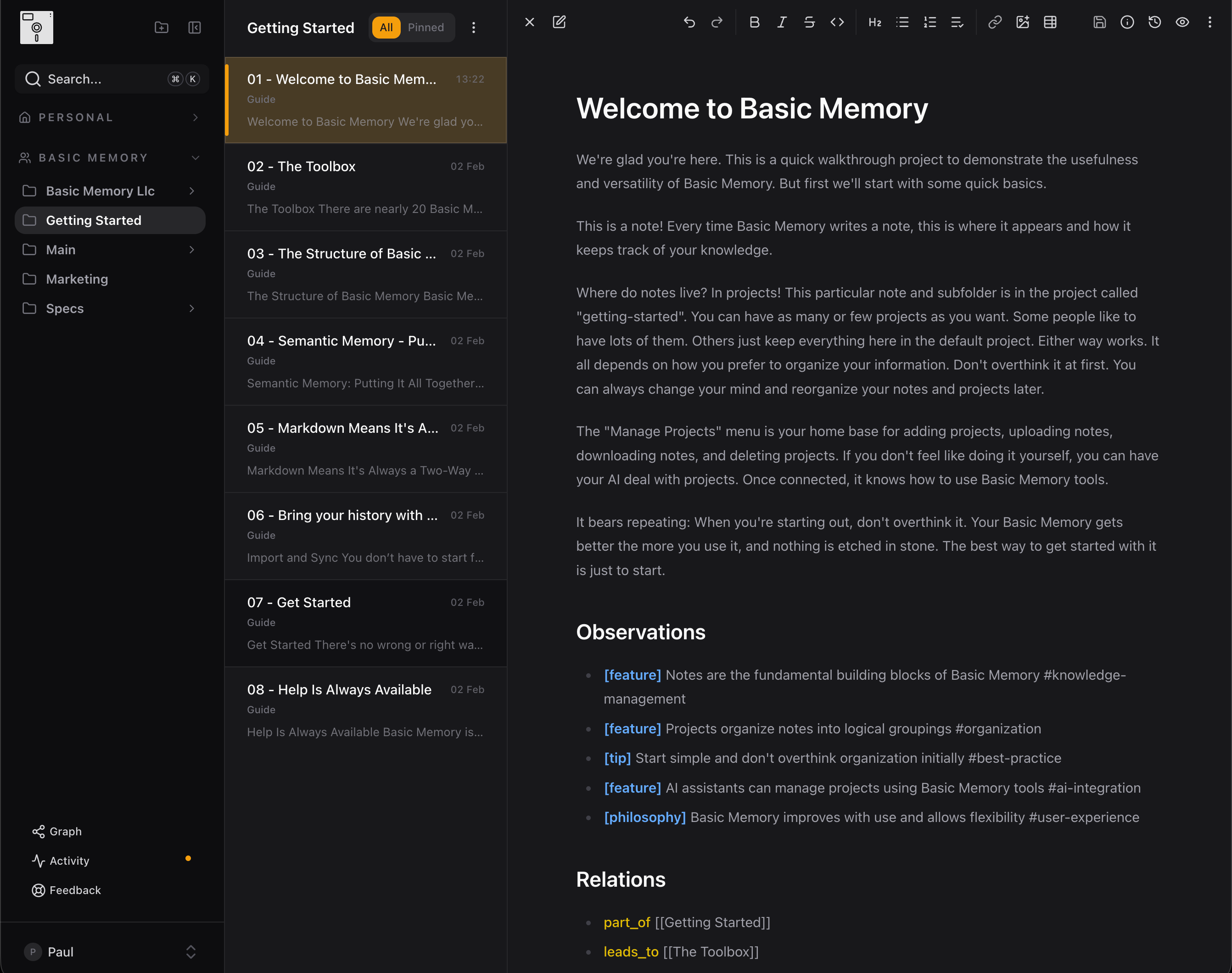
Projects on the left, notes in the middle, your knowledge on the right. Search is always one keystroke away.
Read and edit every note.
Nothing is hidden behind the AI. Open any note, change it, move it, or recover an earlier version.
Search words, meaning, and links.
Find what you remember vaguely, then follow the connected people, projects, decisions, and research around it.
Keep separate projects together.
Organize work, life, and research without locking them into one AI. The same memory can follow you into every connected tool.
Ask once.
Let it become normal.
Add one standing instruction so your AI knows when to save and when to look back.
Add this to your AI’s custom instructions or project instructions after connecting it.
Use Basic Memory Cloud as part of our normal flow. Save a note when we make a decision or learn something worth keeping. Search my notes before answering when past context would help.
Start with something close to home.
Pick one prompt. The structure can grow later; the useful habit is simply deciding what deserves to last.
Keep a project brain
Give decisions, open threads, and next steps somewhere durable to accumulate.
“Use Basic Memory Cloud to start a project note for [project]. Save the decisions we make and link related notes as the work develops.”
Write a daily log
Build a journal your AI can revisit by theme instead of scrolling by date.
“Use Basic Memory Cloud to start a daily journal for me. Save one note per day and connect recurring people, themes, and goals.”
Build a reading shelf
Keep the ideas from books and articles, then connect what repeats across them.
“Use Basic Memory Cloud to track what I read. Save a note for each source with the key ideas and link ideas that connect.”
Remember the decisions
Turn meeting notes into a useful record of outcomes, owners, and follow-ups.
“Use Basic Memory Cloud to save these meeting notes. Pull out the decisions, action items, and owners, then link them to the relevant project.”
Turn the connection into a practice.
Give it a shape and a history.
Your first note proves the connection works. These are the moves that make Basic Memory useful again tomorrow.
Start with memory-onboarding.
This guided skill interviews you about what you want to track, proposes a structure, and builds the schemas, templates, instructions, and real starter notes after you approve the plan. You talk; the skill handles the syntax.
“Use the memory-onboarding skill to help me design a Basic Memory system around what I actually want to remember. Start by interviewing me, propose a simple structure, and do not build anything until I approve the plan.”
Import your old chats.
Upload your ChatGPT or Claude export from Settings → Import Data. Old conversations become searchable Markdown instead of a one-paragraph summary.
Open the import guide →See how Basic Memory works.
Take the short tour of plain Markdown, the knowledge graph, semantic search, projects, history, and sharing.
Take the product tour →Return to your notes.
Read what your AI saved, correct what changed, and let the app become the home base for the knowledge you share.
Open Basic Memory → Just start talking.
Your memory gets better from here.
Your Basic Memory Cloud trial runs for 7 days. Try the save-and-recall loop a few times and see whether returning to old context changes the conversation.
Need a hand? Get support or join Discord.